



Best Online Stock Trading Training in Australia (2026): 7 Free Stock Market Simulators for Beginners

If you're new to investing, a stock market simulator is one of the best ways to build confidence before trading with real funds. These platforms let you practise using real market prices while trading with virtual money, so you can learn from mistakes without losing a dollar.
To help you get started, we've compared the 7 best stock trading simulators in Australia for 2026, highlighting who each platform is best suited for and where it stands out.
Quick Summary: Best Stock Market Simulators in Australia (2026)
Best Overall for Beginners → Mitrade (Free demo account with instant access — no KYC required for demo)
Best for ASX Investing Practice → CommSec Pocket (Easy way to learn Australian share investing with ETFs and ASX exposure)
Best for Technical Analysis → TradingView (Practise directly from interactive charts with powerful indicators)
Best for Social & Copy Trading → eToro (Follow and copy experienced investors while learning market strategies)
Best for Day Trading Practice → Webull (Paper Trading with advanced charts and 50+ technical indicators)
Best for Learning While You Trade → Investopedia Stock Simulator (Educational lessons combined with virtual trading competitions)
Best for Professional Traders → Interactive Brokers (Professional-grade paper trading platform with access to global markets)
What Is a Stock Market Simulator?
A stock market simulator is a virtual trading platform that lets you buy and sell stocks using virtual money instead of real cash. Prices are based on real market data, so you can experience how the market moves without risking your own capital.
Think of it as a practice mode for investing. You'll learn how to place buy and sell orders, set stop-loss and take-profit levels, analyse charts, and build trading strategies—all without worrying about losing money.
A simple way to understand it is to compare it with a flight simulator. Airlines don't allow new pilots to fly a commercial aircraft before completing simulator training. Likewise, new investors can use a stock trading simulator to develop their skills before entering the real market.
In 2026, online stock trading training has become more advanced than ever. Many stock simulators now provide real-time market prices, professional charting tools, technical indicators, and trading interfaces that closely resemble live trading accounts. This allows beginners to gain practical experience and build confidence before investing real money.
Paper Trading vs Demo Account: What's the Difference?
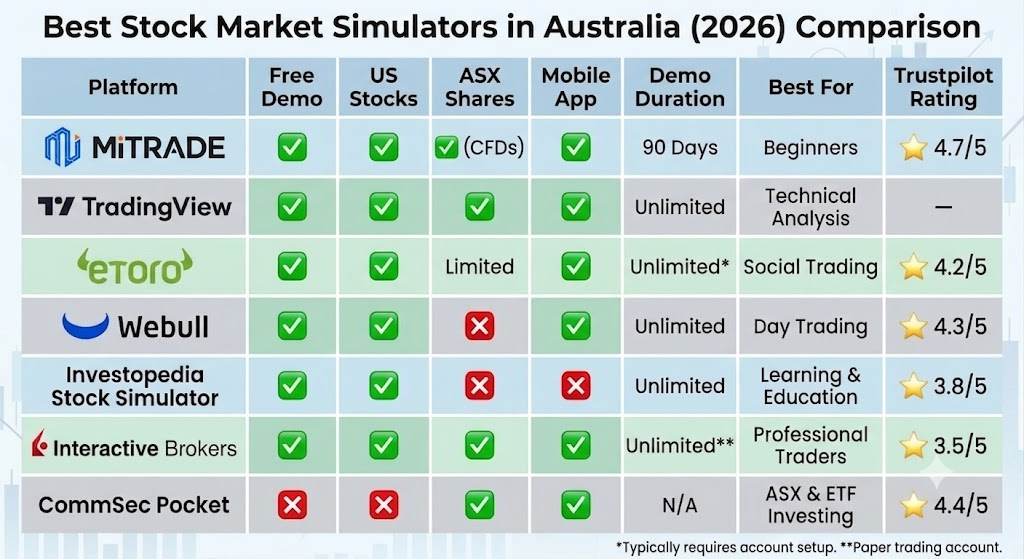
Best Stock Market Simulators in Australia (2026) Comparison
* Notes
Mitrade offers a free demo account with virtual funds US$50,000 for up to 90 days, allowing beginners to practise trading stocks, indices, forex, commodities and CFDs in a realistic environment.
eToro provides an unlimited demo account with US$100,000 in virtual funds and no expiration date.
Interactive Brokers offers a Paper Trading account that mirrors the live trading platform. Access may be suspended if the account remains inactive for an extended period.
Editor's Tip: If you're completely new to investing, Mitrade is the easiest platform to start with thanks to its simple interface and free demo account. For traders focused on chart analysis, TradingView is an excellent companion. If your goal is to practise investing in Australian shares and ETFs rather than CFDs, CommSec Pocket is a good local option.
“Trade Stocks with an ASIC-regulated broker. Fast AUD funding via PayID. ”
7 Best Free Stock Market Simulators in Australia
1. Mitrade — Best Stock Market Simulator for Beginners in Australia
If you're completely new to investing or CFD trading, Mitrade is one of the easiest platforms to get started with. You can open a free demo account in minutes without completing identity verification (KYC), making it ideal for anyone who wants to practise before risking real money.
The platform is designed with beginners in mind, offering a clean interface, real-time market data and virtual funds so you can learn how to trade US stocks, Australian share CFDs, forex, gold, cryptocurrencies and indices in a realistic trading environment.
✅ Pros
Instant demo account with no KYC required, making it one of the fastest platforms to start practising.
Beginner-friendly interface with simple buy and sell functions.
Trade using real-time market prices in a realistic simulation environment.
Comprehensive risk management tools, including Stop Loss, Take Profit and Trailing Stop.
Access to multiple asset classes from a single account, including stocks, forex, commodities, indices and crypto CFDs.
Highly rated by users with a 4.7/5 Trustpilot score.
❌ Cons
Does not support MT4 or MT5, so it may not suit traders planning to use Expert Advisors (EAs).
Focuses on CFD trading rather than direct ownership of ASX-listed shares.
Best For
Beginners who want to learn online stock trading or practise CFD trading in a risk-free environment. Mitrade is particularly well suited to Australian users who primarily trade on mobile devices and want to build confidence before opening a live account.

 Enjoy simple and fast trading Flexible leverage options available Follow real-time trading strategies Demo account with $50,000 virtual funds

2. TradingView — Best for Technical Analysis
TradingView is one of the world's most popular charting platforms and is ideal for traders who want to improve their technical analysis skills. Its Paper Trading feature lets you practise trading with virtual funds while using professional-grade charts and indicators.
✅ Pros
Industry-leading charting tools with 100+ built-in indicators.
Unlimited Paper Trading account.
Supports custom indicators and Pine Script strategies.
Excellent for learning technical analysis.
Works across desktop, web and mobile.
❌ Cons
Not a full-service broker by itself.
Some real-time market data requires a paid subscription.
Less beginner-friendly than dedicated trading apps.
Best For: Traders who want to improve chart reading, technical analysis and strategy testing before placing live trades.
3. eToro — Best for Social Trading
eToro combines a virtual trading account with one of the world's largest social investing communities. Beginners can observe experienced investors, explore portfolios and practise with virtual funds before trading real money.
✅ Pros
Unlimited demo account with US$100,000 virtual funds.
CopyTrader feature allows you to learn from experienced investors.
Beginner-friendly interface.
Supports stocks, ETFs and multiple CFD markets.
Large global investing community.
❌ Cons
Spreads can be wider than some specialist CFD brokers.
Copy Trading does not guarantee profits.
Fewer advanced charting tools than TradingView.
Best For: Beginners who prefer learning by following experienced traders and exploring social investing.
4. Webull — Best for Day Trading Practice
Webull is well known for its advanced Paper Trading mode, making it a popular choice for traders interested in short-term strategies and active trading.
✅ Pros
Unlimited Paper Trading account.
Professional charts with over 50 technical indicators.
Fast and intuitive trading interface.
Suitable for practising day trading strategies.
Free to use.
❌ Cons
No ASX shares.
Focuses primarily on US markets.
Not designed for CFD trading.
Best For: Active traders and beginners who want to practise day trading US stocks before trading with real money.
5. Investopedia Stock Simulator — Best for Learning While You Practise
Investopedia's Stock Simulator combines trading practice with educational resources, making it one of the best platforms for complete beginners.
✅ Pros
Completely free.
Ideal for learning investing fundamentals.
Includes tutorials, articles and investing lessons.
Trading competitions add motivation.
Easy to use.
❌ Cons
No mobile app.
Delayed rather than real-time data.
Limited asset selection.
Best For: Students and first-time investors who want to learn the basics of stock investing in a risk-free environment.
6. Interactive Brokers — Best for Professional Traders
Interactive Brokers offers one of the most sophisticated Paper Trading accounts available, closely replicating its professional trading platform.
✅ Pros
Professional-grade trading platform.
Access to more than 150 global markets.
Advanced order types and risk management tools.
Excellent execution quality.
Ideal for experienced traders.
❌ Cons
Requires identity verification.
Steeper learning curve.
Interface may be overwhelming for beginners.
Best For: Experienced investors and traders who want to practise with institutional-level trading tools before trading live.
7. CommSec Pocket — Best for Australian Share Investing
CommSec Pocket is designed specifically for Australians who want to start investing in ASX-listed ETFs with small amounts of money.
✅ Pros
Built specifically for Australian investors.
Simple, easy-to-use mobile app.
Low minimum investment.
Exposure to diversified ASX ETFs.
Backed by one of Australia's largest banks.
❌ Cons
No demo or paper trading account.
Limited to selected ETFs.
Not suitable for active traders or CFD trading.
Best For: Australians who want to begin investing in ASX ETFs for the long term rather than practising active trading or CFDs.
How to Start Paper Trading in Just 3 Minutes
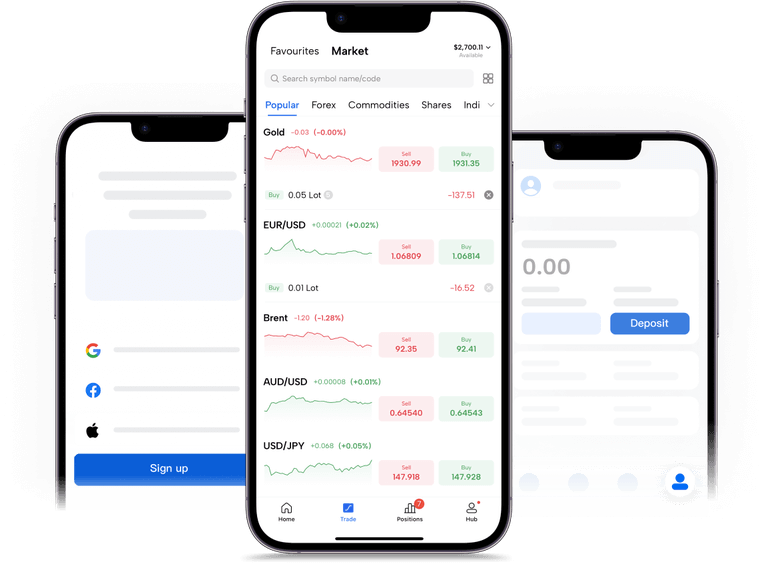
If you've never traded before, the easiest place to start is with a Mitrade Demo Account. Registration takes only a few minutes, no KYC is required for the demo account, and the platform's intuitive interface makes it easy for beginners to place their first trades.
One mistake many beginners make is opening a stock simulator and randomly buying stocks just to see if they can make a profit. That's not training—it's simply gambling with virtual money. While it may be entertaining, it won't help you become a better trader.
Instead, treat your demo account as if it were real money and follow a structured learning plan.
Step 1: Choose the Right Platform for Your Goals
Different simulators are designed for different types of traders.
Complete beginners: Mitrade
Technical analysis: TradingView
Social & Copy Trading: eToro
Day trading: Webull
Investment education: Investopedia Stock Simulator
Professional trading: Interactive Brokers
Long-term ASX investing: CommSec Pocket
Step 2: Open a Demo or Paper Trading Account
Create an account using your email address and check whether the platform requires identity verification (KYC). Many demo accounts can be activated instantly, while some brokers only require KYC when you're ready to trade with real money.
Step 3: Set a Realistic Virtual Balance
Try to match your demo account to the amount you expect to invest in the future.
For example, if you plan to invest A$5,000, don't practise with A$1 million in virtual funds. Trading with unrealistic position sizes often leads to bad habits that don't translate to real markets.
Step 4: Focus on a Small Watchlist
Choose 3 to 5 stocks or markets to follow. Trying to trade dozens of assets at once usually creates confusion. Beginners learn faster by focusing on a small number of markets.
Step 5: Create a Trading Plan Before Every Trade
Before clicking Buy or Sell, write down:
Your entry price
Your target price
Your stop-loss level
Why you're entering the trade
How much you're risking
Trading without a plan usually leads to emotional decisions.
Step 6: Keep a Trading Journal
Record every trade you make. A trading journal is one of the fastest ways to improve your decision-making over time.
Step 7: Review Your Results After 10–20 Trades
Don't judge your ability based on a single winning or losing trade. Consistent habits matter far more than short-term profits.
Common Mistakes Beginners Make When Using a Stock Market Simulator
1. Treating Demo Money Like "Fake Money"
Many beginners take huge positions simply because there's no real financial risk.
This creates poor habits that can be costly later.
Trade your demo account exactly as you would a live account:
Always use a Stop Loss.
Risk only a small percentage of your account on each trade.
Avoid going "all in" on a single position.
2. Switching to a Live Account Too Quickly
Some traders spend only one or two weeks practising before risking real money.
The problem is that markets constantly change.
You'll experience:
Bull markets
Bear markets
Sideways markets
High-volatility events
Practising for at least 30–60 days gives you experience across different market conditions and helps build consistency.
3. Ignoring Stop Loss Orders
Many demo traders skip stop losses because losing virtual money doesn't feel important.
Unfortunately, this habit often carries over into live trading.
Build discipline early by placing a stop loss on every trade—even in your demo account.
4. Practising on a Different Platform Than You'll Use Later
If you spend months learning on one simulator but eventually open a live account with another broker, you'll have to learn a completely different trading interface.
To make the transition easier, practise on the same platform you plan to use for live trading. If you're considering opening a live Mitrade account, using the Mitrade Demo Account first will help you become familiar with its tools, order types and trading workflow.
5. Measuring Success Only by Demo Profits
A profitable demo account doesn't necessarily mean you're ready to trade with real money.
Instead of focusing only on your virtual profits, track performance metrics such as:
Win Rate
Risk-to-Reward Ratio
Maximum Drawdown
Whether you consistently followed your trading plan
Successful traders build good habits first. Consistent execution and disciplined risk management are far more valuable than a few lucky winning trades.
You might be interested in…
1. What is the best stock market simulator in Australia?
For most beginners, Mitrade is one of the best stock market simulators in Australia thanks to its free 90-day demo account, user-friendly interface and access to multiple CFD markets, including US stocks, Australian share CFDs, forex, gold and cryptocurrencies. If your focus is technical analysis, TradingView is an excellent alternative, while eToro is ideal for learning through Copy Trading.
2. Are stock market simulators free?
Yes. Most major trading platforms offer free stock market simulators or demo accounts. Platforms such as Mitrade, TradingView, eToro, Webull, and Investopedia Stock Simulator allow you to practise trading with virtual money at no cost.
3. What's the difference between a stock simulator and a demo account?
A stock simulator is a broad term for any platform that lets you practise investing with virtual money.
A demo account is usually provided by a broker and closely replicates a live trading account, allowing you to place virtual buy and sell orders using real market prices. If you plan to trade CFDs or stocks in the future, a demo account provides a more realistic learning experience.
4. Can I practise trading Australian shares?
Yes. Several platforms allow you to practise trading Australian markets.
If you want to analyse ASX-listed shares, TradingView is an excellent option. If you want to practise trading Australian share CFDs alongside global markets, Mitrade offers a free demo account with real-time market conditions.
Disclaimer: The content presented above, whether from a third party or not, is considered as general advice only. CFD trading involves significant risk of loss. Past performance does not guarantee future results. This article serves informational purposes only and does not constitute financial advice. Consider your risk tolerance before trading.


