

Mitrade vs. MetaTrader 4: Which is the Best Trading Platform in Australia?

Investors searching for the best trading platform in Australia are bound to encounter MetaTrader 4 (MT4). It established itself early as a standard for forex trading, and after more than two decades in the market, many traders still rely on it out of familiarity.
However, software originally designed for desktop trading environments can introduce friction in today’s fast-moving markets. When daily routines demand speed, mobile accessibility, and clear visual feedback, traders benefit from platforms that execute orders quickly, display risk exposure in real time, and minimize the need for additional installations or external tools.
Mitrade was developed with these modern trading demands in mind. It operates as a web-based and mobile-first CFD platform that reduces setup complexity and integrates essential tools into a single environment, allowing traders to focus on execution rather than configuration.
Below, we compare how these two platforms differ across core structure, asset availability, and day-to-day usability, helping investors determine which system best aligns with their trading style.
Mitrade vs. MT4: Summary Comparison
The following table outlines the core structural and functional differences between the two trading systems.
Legacy vs. Modern Integration
MetaTrader 4 was engineered in 2005 for a desktop-focused trading environment. While it met the operational requirements of that era, today’s fast-paced markets demand immediate access to macroeconomic data and market sentiment. Because MT4 functions primarily as a technical execution terminal, accessing this critical information frequently requires complicated broker integrations or third-party plugins.
Installing and maintaining these external tools adds unnecessary workload to an investor's daily routine. Consequently, many traders simply switch back and forth between their trading terminal and separate financial websites, dividing their focus exactly when concentration on price action is most important.
Mitrade resolves this fragmented workflow by consolidating essential analytical tools into a single, native environment. The platform directly integrates:
Live Economic Calendars: Track interest rate decisions and major data releases without leaving the application.
Real-time News Updates: Read market developments directly within the primary workspace.
Client Sentiment Indicators: View live market positioning without downloading external indicator files.
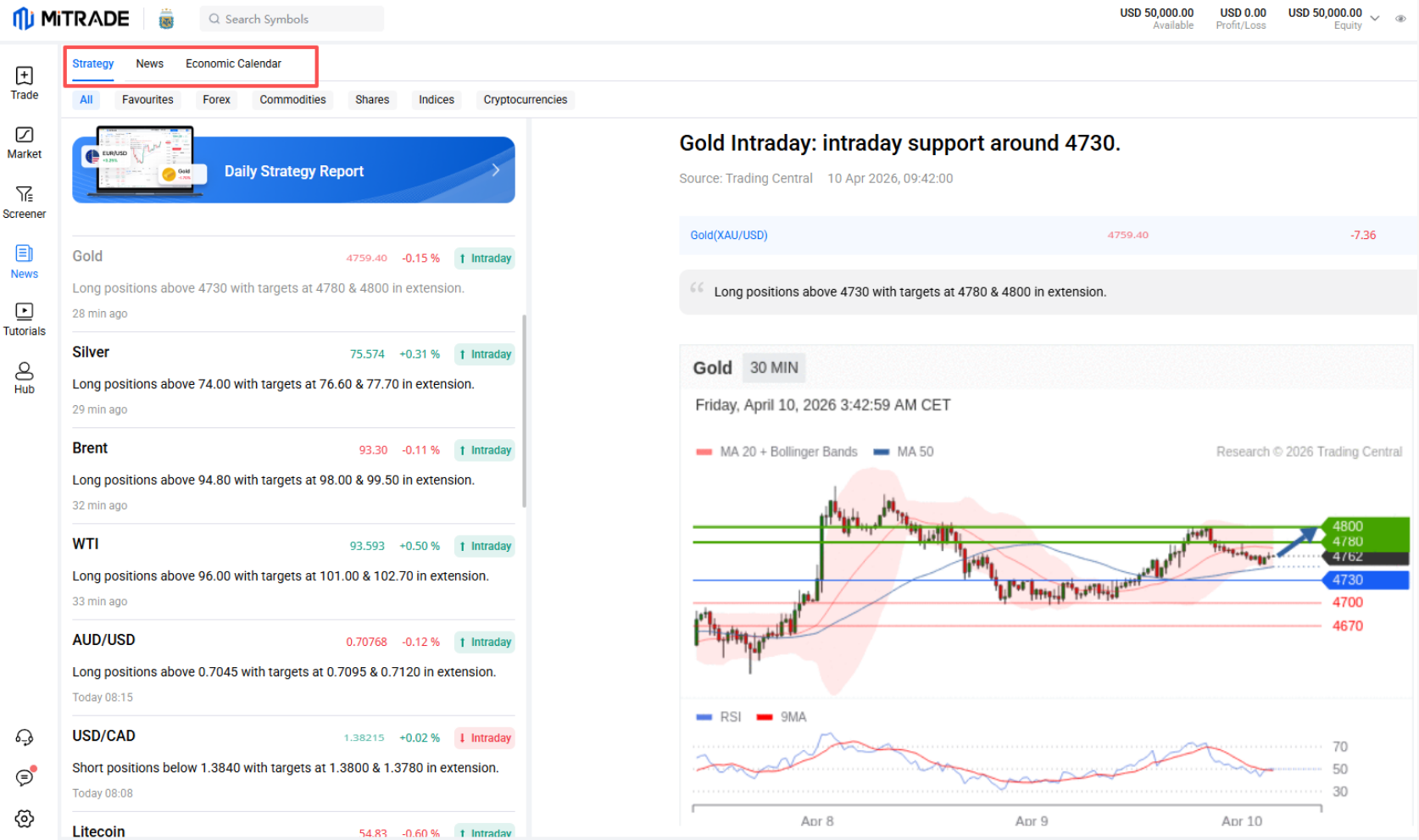
By keeping all critical data centralized, investors can read an economic release and execute a position without ever looking away from their active charts.
“Trade Global Markets with an ASIC-regulated broker. Fast AUD funding via PayID. ”
User Interface and Execution Efficiency
A platform’s user interface directly impacts how efficiently an investor can react to market movements and manage financial risk. MetaTrader 4 retains the design standards of its 2005 release, utilizing a workspace with disjointed windows, cascading charts, and an isolated order ticket. While MT4 provides basic margin data, advanced position sizing and risk visualization often require additional software.
Conversely, Mitrade prioritizes a consolidated interface designed to display all critical information within one unified workspace. The platform reduces the need for manual calculation steps, allowing investors to focus entirely on strategy and market timing rather than calculation.
When a user opens an order ticket on Mitrade, the system automatically displays:
Required Margin: Instantly view the exact capital needed to open the position.
Pip Value: Understand the precise monetary value per point of movement.
Projected Profit/Loss: See the exact capital exposure based on the selected stop-loss and take-profit levels.
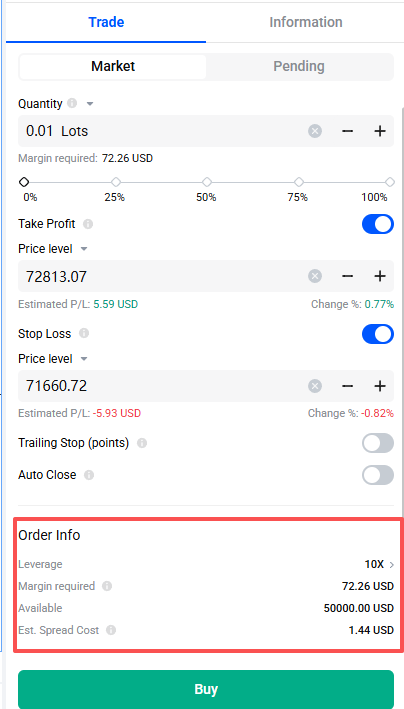
This immediate visual presentation allows retail traders to confirm their specific financial risk before finalizing any execution.
Automated Trading and Algorithmic Execution
Automated trading is a core functional difference between the two systems. MetaTrader 4 is widely recognized for its algorithmic capabilities, providing the necessary infrastructure for programmers to build and deploy automated strategies. Conversely, Mitrade focuses primarily on optimizing the manual trading experience.
This functional distinction clearly defines the target user for each platform:
MetaTrader 4 (Algorithmic Focus): Utilizes the MQL4 programming language to build, backtest historical strategies, and deploy automated trading scripts (Expert Advisors). However, utilizing this infrastructure requires specific coding expertise or careful evaluation of third-party code quality and reliability.
Mitrade (Manual Focus): Does not support external EAs or fully automated algorithmic trading. Instead, the platform delivers integrated tools and interfaces designed specifically for investors who prefer to analyze market data and execute their strategies manually.
Ultimately, MT4 strongly supports algorithmic and customization-focused traders, while Mitrade serves the retail investor seeking immediate, direct control over their daily market positions.
“Trade Global Markets with an ASIC-regulated broker. Fast AUD funding via PayID. ”
The Mobile Angle
Mobile trading has transitioned from a secondary monitoring option to a primary method of execution. Investors now expect full analytical capabilities away from their desktop workstations.
The MetaTrader 4 mobile application delivers a simplified version of the desktop platform’s functionality. This creates distinct mechanical difficulties for technical traders. Applying drawing tools, such as Fibonacci retracements or trendlines, can be less precise when performed on smaller touchscreen devices. Furthermore, modifying active stop-loss orders during periods of high market volatility forces users to navigate through multiple sub-menus, which can slow navigation during fast-moving market conditions.
Mitrade engineered its mobile application specifically for touchscreen navigation, treating it as a primary trading environment rather than a ported afterthought. Available natively on iOS and Android, the app delivers a broad range of platform functionality without the interface friction.
When utilizing the Mitrade mobile app, investors benefit from:
Native Touch Charting: Apply technical indicators and adjust timeframes using controls designed specifically for mobile screens.
Streamlined Order Management: Open positions and modify execution parameters without navigating away from the active price chart.
Visible Risk Controls: Monitor and adjust trailing stops and profit targets directly on the primary viewing screen.
This structural design ensures traders can manage complex positions and react to sudden market volatility with greater speed and confidence, regardless of their location.
Asset Access and Account Consolidation
MetaTrader 4 was developed specifically for foreign exchange trading. As retail demand expanded to include indices, commodities, and cryptocurrencies, brokers adapted the MT4 infrastructure to offer these external assets via Contracts for Difference (CFDs).
However, this adaptation process reflects the legacy design of the underlying software architecture. Depending on the broker configuration, accessing a wide range of asset classes on MT4 may involve switching between accounts or server environments. This fragmentation complicates portfolio management and can slow trade execution when an investor needs to move rapidly between different financial markets.
Mitrade resolves this structural limitation by consolidating market access into a single retail account. The platform natively supports over 300 global financial instruments without requiring secondary logins or separate server configurations.
Through one centralized account, investors can trade:
Forex: Access major, minor, and exotic currency pairs with competitive, floating spreads.
Commodities: Trade energy markets and precious metals, including XAU/USD, directly alongside fiat currencies.
Global Indices: Gain broad market exposure to international exchanges, such as the US Wall Street 30 and the Australian ASX 200.
Cryptocurrency: Trade digital assets without the requirement of external digital wallets or complex private keys.
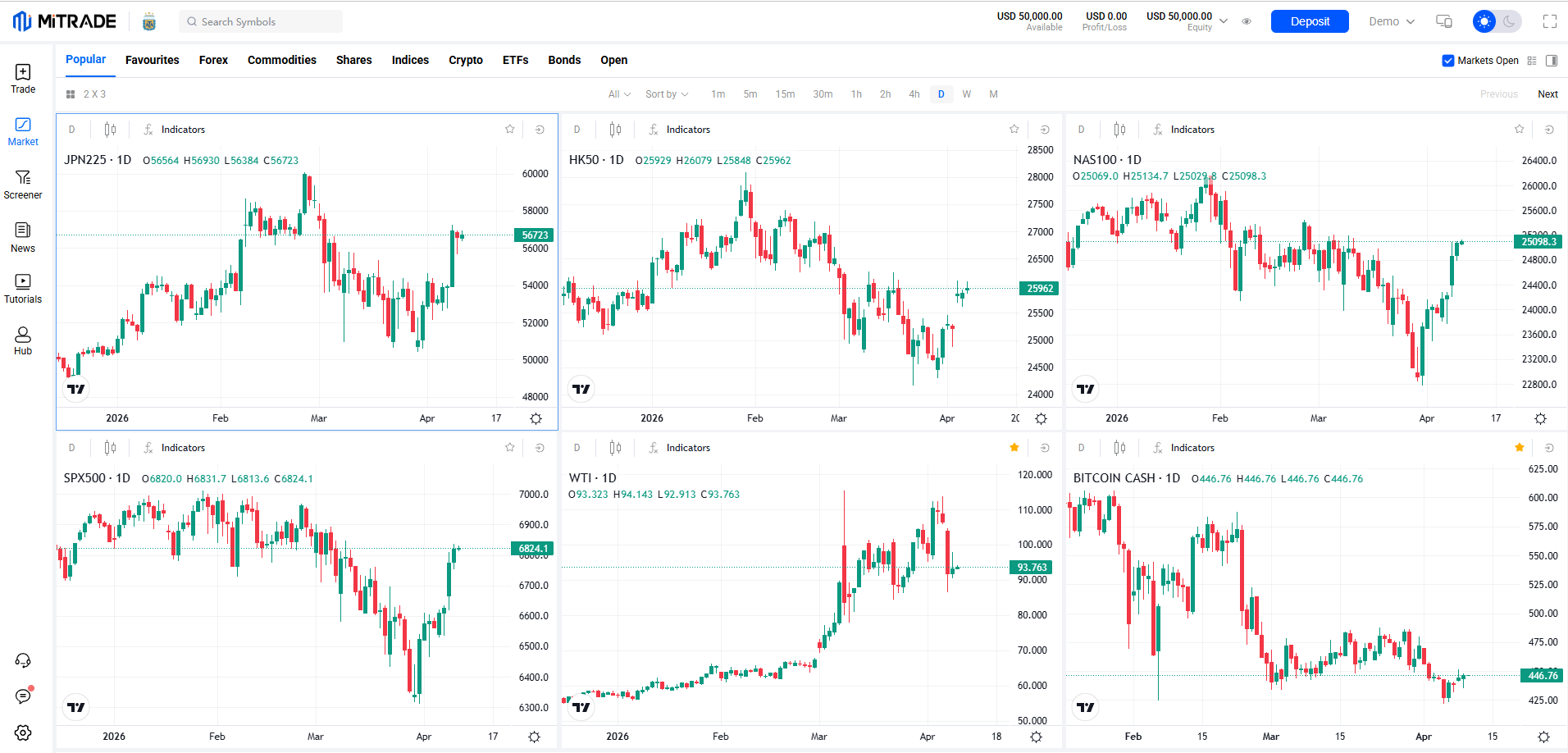
By providing continuous access across all these asset classes, Mitrade eliminates the administrative workload of managing multiple accounts. This allows investors to transition immediately from executing a forex trade to monitoring a commodity position within the same trading environment.
“Trade Global Markets with an ASIC-regulated broker. Fast AUD funding via PayID. ”
A Logical Evolution for Modern Traders
MetaTrader 4 still has a clear place in today’s market. Traders who rely on automated systems or custom indicators continue to use MT4 because its MQL4 framework supports deep customization and long-established workflows. For those users, it remains a capable and specialized platform.
For many manual retail traders, however, priorities have shifted toward speed, clarity, and ease of access across devices. Platforms designed around integrated tools and mobile-first workflows better align with the pace of modern trading. Mitrade reflects this approach by combining market access, economic calendars, risk controls, and execution tools within a single interface, while operating under the oversight of the Australian Securities and Investments Commission (ASIC).
Ultimately, the choice between MT4 and Mitrade comes down to how you trade. Traders focused on automation and customization may continue to prefer MT4. At the same time, those who value manual execution, mobile usability, and streamlined workflows may find an integrated platform like Mitrade better suited to their daily trading routine.
Ready to Try a Different Trading Experience?
Choosing a trading platform is a practical decision, and the best way to evaluate any system is through direct experience. Mitrade offers a demo account loaded with virtual funds, allowing investors to explore its integrated tools, mobile charting features, and risk controls without committing real capital.
With a minimum deposit starting from $100, traders can move from testing to live trading when they feel confident in the platform’s workflow.
Open a demo account today and see how a fully integrated trading environment fits into your daily routine.


1. Can investors use MetaTrader 4 indicators on Mitrade?
No. Mitrade operates on a proprietary platform and does not support MT4’s MQL4 programming language or custom Expert Advisors (EAs). Instead, the platform includes a range of standard technical indicators, including MACD, RSI, and Bollinger Bands, within its native interface.
2. Is client capital secure on the Mitrade platform?
Yes. In Australia, Mitrade operates under the regulatory oversight of the Australian Securities and Investments Commission (ASIC) under AFSL number 398528. Client funds are required to be held in segregated trust accounts, separating retail client money from company operational funds in accordance with regulatory requirements.
3. Does Mitrade charge execution commissions like some MT4 brokers?
Mitrade uses a commission-free trading model on most instruments, with trading costs incorporated into spreads. Standard overnight funding charges (swap fees) may apply if leveraged CFD positions are held beyond the daily rollover period.
4. How quickly can a new account be funded?
Mitrade supports fast deposits using localized methods such as POLi, PayID, and Visa/Mastercard. Withdrawal requests are typically processed within one to two business days, depending on the payment method.
Disclaimer: The content presented above, whether from a third party or not, is considered as general advice only. CFD trading involves significant risk of loss. Past performance does not guarantee future results. This article serves informational purposes only and does not constitute financial advice. Consider your risk tolerance before trading.


